Professional color grading from a single sentence
Videoleap helps creators and businesses make social media videos, from a template or from scratch. Its color grading, though, meant static filter presets: quick, but without the customization or precision of professional grading, which takes advanced software and a trained eye.
- Project
- AI Recolor
- Company
- Videoleap
- Role
- Product designer
- Team
- Product manager, data analyst, UX researcher, UX writer, development team, and marketing team
The challenge
Presets are quick but generic; professional grading takes expertise
User pain points
Filters feel limiting, and pro tools feel too complex
The solution
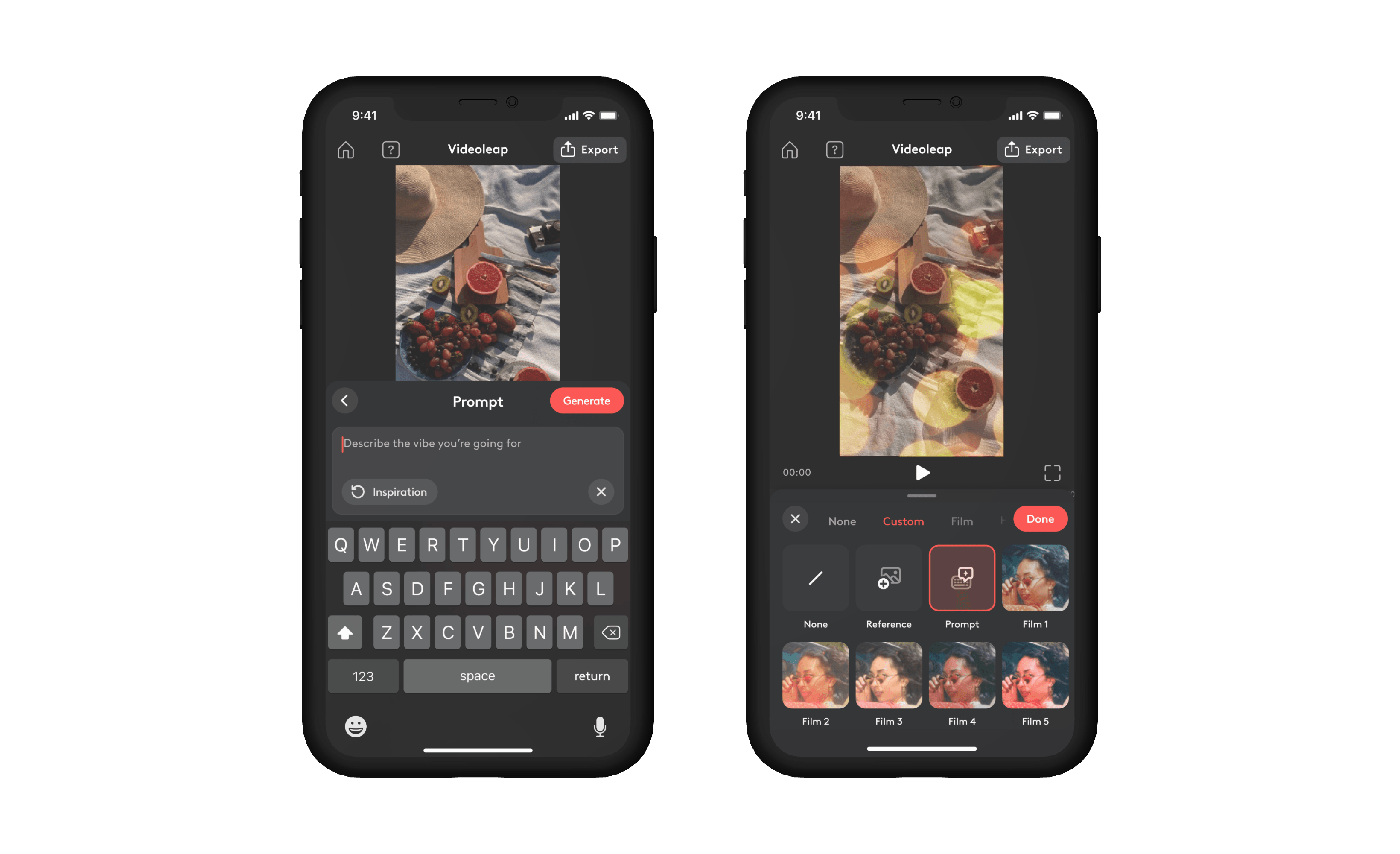
Describe a look in words, and AI grades the video to match
Goals
More use of AI edits, better retention and more premium upgrades
Process
Started by indexing and categorizing all existing filters and effects within Videoleap, to bring AI Recolor to life. Working closely with developers, tagged and described each filter so the AI model could recognize and apply them accurately. This structured database allowed the AI to intelligently match user inputs with the most relevant styles.
Screenshot from the database Conducted a competitive analysis, benchmarking AI-powered creative tools like Adobe Premiere, CapCut, and Runway. The common UX pain points found there shaped a more intuitive and flexible flow for AI Recolor.
Focused the design on seamless integration into Videoleap’s existing UI. Instead of introducing unnecessary complexity, optimized current elements to support AI Recolor’s workflow, and created high-fidelity wireframes to define a smooth and intuitive user flow.
Researched and sketched multiple icon ideas in Figma for the feature’s visual identity, aiming for a design that aligned with Videoleap’s existing iconography while clearly representing AI Recolor’s functionality.
Icon sketches for AI Recolor Collaborated with UX writers to refine the messaging and prompts, ensuring clear and engaging interactions. Together, crafted AI-generated text suggestions to guide users effectively, and finalized the name “AI Recolor” to balance clarity with creative appeal.
Worked closely with engineers during the development phase, providing detailed UI specs, interaction flows, and edge case scenarios, and stayed involved so that the final implementation accurately translated the design into a seamless and intuitive experience.
MVP features
A dedicated entry point on the home screen, so AI Recolor is easy to find.
Multi-selection on the import screen, so users can bring in several assets at once.
A drawer for free-text prompts, with short text suggestions and visual thumbnails to spark ideas.
A loading state that sets expectations while the style is generated.
The style appears in the editor, where users can see its effect and the tool layers behind it.
Final result
Discussion
In the fast-paced mobile video editing industry, timely innovation is crucial. The initial release of AI Recolor was an MVP version, designed to gauge user interest and maintain a competitive edge.
To improve AI Recolor, two key challenges need addressing: difficulties with the current keyboard drawer and the process of applying the AI filter. The keyboard drawer lacks guidance, leading to confusion and ineffective inputs. Moreover, users have to undo and restart each iteration of applying the AI filter, which hinders their ability to experiment.
Proposed solution: an AI filters preset drawer, and a typing area enhanced with prompt suggestions. This setup will streamline the selection process, encourage users to explore different options, preview outcomes, and easily select the most suitable AI-generated filter.